Scenes and motion
A scene is an immutable collection of nodes with stable ids and a camera. A motion changes node properties over time. Neither one knows about a renderer.
2D scenes
from kinetickit import (
    Animation,
    Bounds2D,
    Group2D,
    Line2D,
    Path2D,
    PathNode2D,
    Scene2D,
    Shape2D,
    Transform2D,
    Vec2,
    ease,
)

x_axis = Line2D(id="x-axis", start=Vec2(0, 0), end=Vec2(10, 0), width=1.5, color="#000000")
y_axis = Line2D(id="y-axis", start=Vec2(0, 0), end=Vec2(0, 8), width=1.5, color="#000000")
curve = PathNode2D.polyline(
    "curve", [(0, 7), (2, 4.5), (4, 3), (7, 1.6), (10, 1)], width=3, color="#000000", draw_progress=0.0
)
area = Shape2D(id="area", path=Path2D.rect(0, 0, 4, 3), fill="#bbbbbb", opacity=0.0)
plot = Group2D(id="plot", children=(x_axis, y_axis, area, curve))

scene = Scene2D(plot)
scene = scene.bind({scene.camera.ref("view"): Bounds2D(Vec2(-1, -1), Vec2(12, 9))})

draw = curve.animate.draw_progress.to(1.0, duration=1.5, easing=ease.in_out_cubic)
fade = area.animate.opacity.to(1.0, duration=0.8)
move = plot.animate.transform.to(Transform2D(translate=Vec2(1, 0.6)), duration=0.8)

Animation(scene, draw.then(fade).then(move)).save("scene2d.svg", width=455, height=315)
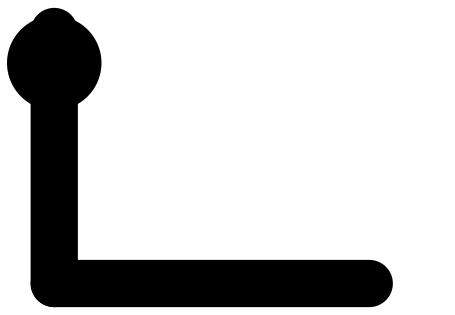
A path draws itself, a shape fades in, and the whole group moves; then the motion runs backward.
Every node type lists what can be animated: Point2D.animatable_properties() returns the property names and their value types, and node.animate.<property> builds a motion for one of them. Colours, vectors, angles and transforms interpolate by their own rules (Interpolation and transforms).
Line2D(
    *,
    id,
    opacity=1.0,
    z=0.0,
    visible=True,
    semantics=None,
    color=...,
    width=2.0,
    cap='round',
    join='round',
    dash=(),
    draw_progress=1.0,
    start=Vec2(x=0.0, y=0.0),
    end=Vec2(x=1.0, y=0.0),
)
A stroked segment between two points. Its endpoints, colour, width, dash pattern and drawing progress can be animated.
PathNode2D(
    *,
    id,
    opacity=1.0,
    z=0.0,
    visible=True,
    semantics=None,
    color=...,
    width=2.0,
    cap='round',
    join='round',
    dash=(),
    draw_progress=1.0,
    path=...,
)
An open or closed stroked Path2D. It keeps line and Bézier commands and supports path morphing. PathNode2D.polyline(id, points) is the shortcut for straight segments.
Shape2D(
    *,
    id,
    opacity=1.0,
    z=0.0,
    visible=True,
    semantics=None,
    path=...,
    fill=...,
    fill_rule='nonzero',
    stroke=None,
    stroke_width=1.0,
    join='round',
    dash=(),
)
A filled path, optionally with a stroke. Use it for areas, closed outlines and compound shapes.
Group2D(
    *,
    id,
    opacity=1.0,
    z=0.0,
    visible=True,
    semantics=None,
    children=(),
    transform=...,
    clip=None,
)
A node that applies one transform, opacity and clip to an ordered collection of children.
Text2D(
    *,
    id,
    opacity=1.0,
    z=0.0,
    visible=True,
    semantics=None,
    asset=None,
    position=Vec2(x=0.0, y=0.0),
    rotation=0.0,
    scale=1.0,
    color=...,
)
A positioned TextAsset from a typography adapter, with animatable scale, transform and opacity (Typography).
Camera2D(
    *,
    id='camera',
    opacity=1.0,
    z=0.0,
    visible=True,
    semantics=None,
    view=None,
    pan=Vec2(x=0.0, y=0.0),
    zoom=1.0,
)
Defines the visible rectangle of the 2D world and how it maps to the output viewport. Set it through scene.bind({scene.camera.ref("view"): Bounds2D(...)}). The view keeps its aspect ratio, so an output of another shape shows margins.
3D scenes
import numpy as np

from kinetickit import Animation, Camera3D, DirectionalLight3D, Point3D, Scene3D, Surface3D, Vec3
from kinetickit.styles import ColorScale, Material

xs = ys = np.linspace(-2, 2, 28)
X, Y = np.meshgrid(xs, ys)
Z = np.sin(np.hypot(X, Y) * 2.2) / (1 + np.hypot(X, Y))
surface = Surface3D.height_field(
    "surface", xs, ys, Z, colorscale=ColorScale.viridis_like(), material=Material(0.4, 0.6, 0.2, 24)
)
scene = Scene3D(
    surface,
    Point3D(id="peak", position=Vec3(0, 0, 1.0), size=6, color="#d62728"),
    DirectionalLight3D(id="sun"),
    camera=Camera3D(position=Vec3(5.5, -6.5, 4.2), target=Vec3(0, 0, 0.2)),
)
orbit = scene.camera.animate.position.to(Vec3(-6, -5.5, 4.2), duration=2.0)
Animation(scene, orbit).save("surface.gif", width=320, height=240, fps=10)
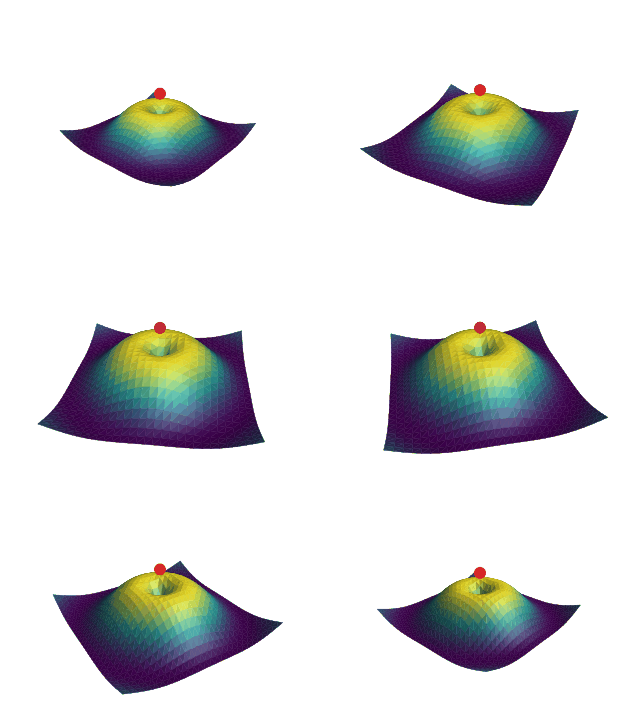
A lit height-field surface while the camera orbits it.
Scene3D(*nodes, overlay=(), camera=None)An immutable 3D scene with geometry, lights, groups and one camera.
Point3D(
    *,
    id,
    opacity=1.0,
    z=0.0,
    visible=True,
    semantics=None,
    position=Vec3(x=0.0, y=0.0, z=0.0),
    size=4.0,
    symbol='circle',
    color=...,
)
A point marker in 3D with animatable position, size, colour and opacity.
Line3D(
    *,
    id,
    opacity=1.0,
    z=0.0,
    visible=True,
    semantics=None,
    color=...,
    width=2.0,
    cap='round',
    join='round',
    dash=(),
    draw_progress=1.0,
    start=Vec3(x=0.0, y=0.0, z=0.0),
    end=Vec3(x=1.0, y=0.0, z=0.0),
)
A single 3D segment, projected by the active camera.
Polyline3D(
    *,
    id,
    opacity=1.0,
    z=0.0,
    visible=True,
    semantics=None,
    color=...,
    width=2.0,
    cap='round',
    join='round',
    dash=(),
    draw_progress=1.0,
    points=...,
    closed=False,
)
An ordered chain of 3D points, drawn as connected segments.
Mesh3D(
    *,
    id,
    opacity=1.0,
    z=0.0,
    visible=True,
    semantics=None,
    color=...,
    material=...,
    edge_color=None,
    edge_width=0.5,
    two_sided=True,
    mesh=...,
)
Indexed vertices and faces with validated topology, optional per-face colour and material settings.
Surface3D(
    *,
    id,
    opacity=1.0,
    z=0.0,
    visible=True,
    semantics=None,
    color=...,
    material=...,
    edge_color=None,
    edge_width=0.5,
    two_sided=True,
    grid=...,
    colorscale=None,
    value_range=None,
)
A regular height-field surface built from an \(x,y\) grid and height values. Surface3D.height_field(id, xs, ys, zs) is the usual constructor.
Group3D(
    *,
    id,
    opacity=1.0,
    z=0.0,
    visible=True,
    semantics=None,
    children=(),
    transform=...,
)
An ordered group of 3D nodes that share a transform and an opacity.
Camera3D(
    *,
    id='camera',
    opacity=1.0,
    z=0.0,
    visible=True,
    semantics=None,
    position=Vec3(x=5.0, y=-7.0, z=4.0),
    target=Vec3(x=0.0, y=0.0, z=0.0),
    up=Vec3(x=0.0, y=0.0, z=1.0),
    projection='perspective',
    fov=0.6981317007977318,
    ortho_height=6.0,
    near=0.1,
    far=1000.0,
)
A perspective or orthographic camera with position, target, clipping planes and projection settings. Its properties animate like any node's, so an orbit is one position motion.
A point or direction in 3D.
ColorScale(stops)Ordered (position, colour) pairs from 0 to 1.
Maps a value to a colour through ordered stops.
Material(ambient=0.35, diffuse=0.65, specular=0.0, shininess=32.0)Share that is always lit.
Share that follows the light.
Strength of the highlight.
Tightness of the highlight.
Ambient, diffuse and specular response of a surface.
DirectionalLight3D(
    *,
    id,
    opacity=1.0,
    z=0.0,
    visible=True,
    semantics=None,
    direction=Vec3(x=-0.4, y=0.6, z=-0.7),
    color=...,
    intensity=1.0,
)Stable id.
Direction the light travels.
Brightness.
A light that shines in one direction, as the sun does.
Composing time
MotionAn immutable description of change over time. Motions can be sequenced, overlapped, delayed, repeated, reversed or trimmed.
Timeline(motion, base, registry=...)The compiled, random-access form of a motion tree. It evaluates property values at any valid time.
Keyframe(time, value, easing=None, hold=False)One value at one time, optionally carrying the easing rule for the interval that follows. hold=True keeps the value until the next keyframe.
Keyframes(target, frames, easing=...)A validated sequence of keyframes for one property, with checks for the endpoints and for ordering.
motion = (
    a.animate.position.to(Vec2(5, 5), duration=1.0)
    .then(b.animate.opacity.to(1.0, duration=0.5))
    .with_(c.animate.size.to(9, duration=0.5), offset=1.0)
    .mark("settled")
)
then starts the next motion when the previous one ends. with_ starts it at an offset inside the previous one. Time and easing gives the durations of both.
Transitions between scenes
Builds a motion between two scenes. Nodes with the same id are matched and their compatible properties are interpolated.
TransitionPolicy(enter='fade', exit='fade')Controls how a node without a partner, or with an incompatible structure, enters, leaves, cross-fades or fails.
Paths, meshes and surfaces have their own morphing tools. When automatic normalization cannot infer the topology you mean, give an explicit correspondence (Morphing).