场景与动作
场景是不可变的节点集合,节点有稳定的编号,另外还有一个相机。动作则是让节点的属性随时间变化。两者都不知道绘图端的存在。
2D 场景
from kinetickit import (
    Animation,
    Bounds2D,
    Group2D,
    Line2D,
    Path2D,
    PathNode2D,
    Scene2D,
    Shape2D,
    Transform2D,
    Vec2,
    ease,
)

x_axis = Line2D(id="x-axis", start=Vec2(0, 0), end=Vec2(10, 0), width=1.5, color="#000000")
y_axis = Line2D(id="y-axis", start=Vec2(0, 0), end=Vec2(0, 8), width=1.5, color="#000000")
curve = PathNode2D.polyline(
    "curve", [(0, 7), (2, 4.5), (4, 3), (7, 1.6), (10, 1)], width=3, color="#000000", draw_progress=0.0
)
area = Shape2D(id="area", path=Path2D.rect(0, 0, 4, 3), fill="#bbbbbb", opacity=0.0)
plot = Group2D(id="plot", children=(x_axis, y_axis, area, curve))

scene = Scene2D(plot)
scene = scene.bind({scene.camera.ref("view"): Bounds2D(Vec2(-1, -1), Vec2(12, 9))})

draw = curve.animate.draw_progress.to(1.0, duration=1.5, easing=ease.in_out_cubic)
fade = area.animate.opacity.to(1.0, duration=0.8)
move = plot.animate.transform.to(Transform2D(translate=Vec2(1, 0.6)), duration=0.8)

Animation(scene, draw.then(fade).then(move)).save("scene2d.svg", width=455, height=315)
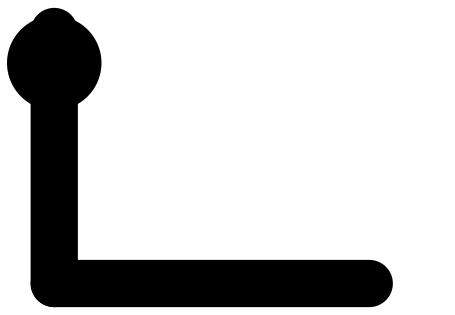
路径逐段画出,图形淡入,整个群组移动;接着动作倒着播放。
每种节点都能查到哪些属性可以制作动画:Point2D.animatable_properties() 返回属性名称与数值类型,node.animate.<属性> 则为其中一个属性创建动作。颜色、矢量、角度与变换各依自己的规则插值(参见插值与变换)。
Line2D(
    *,
    id,
    opacity=1.0,
    z=0.0,
    visible=True,
    semantics=None,
    color=...,
    width=2.0,
    cap='round',
    join='round',
    dash=(),
    draw_progress=1.0,
    start=Vec2(x=0.0, y=0.0),
    end=Vec2(x=1.0, y=0.0),
)
两点之间的描边线段。端点、颜色、线宽、虚线样式与绘制进度都能制作动画。
PathNode2D(
    *,
    id,
    opacity=1.0,
    z=0.0,
    visible=True,
    semantics=None,
    color=...,
    width=2.0,
    cap='round',
    join='round',
    dash=(),
    draw_progress=1.0,
    path=...,
)
开放或封闭的描边 Path2D。它保留直线与 Bézier 命令,并支持路径变形。PathNode2D.polyline(id, points) 是画直线折线的捷径。
Shape2D(
    *,
    id,
    opacity=1.0,
    z=0.0,
    visible=True,
    semantics=None,
    path=...,
    fill=...,
    fill_rule='nonzero',
    stroke=None,
    stroke_width=1.0,
    join='round',
    dash=(),
)
填色的路径,可另外加描边。用于区域、封闭轮廓与复合图形。
Group2D(
    *,
    id,
    opacity=1.0,
    z=0.0,
    visible=True,
    semantics=None,
    children=(),
    transform=...,
    clip=None,
)
对一串有顺序的子节点,统一套用变换、透明度与裁切的节点。
Text2D(
    *,
    id,
    opacity=1.0,
    z=0.0,
    visible=True,
    semantics=None,
    asset=None,
    position=Vec2(x=0.0, y=0.0),
    rotation=0.0,
    scale=1.0,
    color=...,
)
由排版适配器产生、已定位的 TextAsset,缩放、变换与透明度都能制作动画(参见文本排版)。
Camera2D(
    *,
    id='camera',
    opacity=1.0,
    z=0.0,
    visible=True,
    semantics=None,
    view=None,
    pan=Vec2(x=0.0, y=0.0),
    zoom=1.0,
)
定义 2D 世界中可见的矩形,以及它如何对应到输出窗口。用 scene.bind({scene.camera.ref("view"): Bounds2D(...)}) 设置。视野会维持长宽比,所以输出尺寸的比例不同时,会出现留白。
3D 场景
import numpy as np

from kinetickit import Animation, Camera3D, DirectionalLight3D, Point3D, Scene3D, Surface3D, Vec3
from kinetickit.styles import ColorScale, Material

xs = ys = np.linspace(-2, 2, 28)
X, Y = np.meshgrid(xs, ys)
Z = np.sin(np.hypot(X, Y) * 2.2) / (1 + np.hypot(X, Y))
surface = Surface3D.height_field(
    "surface", xs, ys, Z, colorscale=ColorScale.viridis_like(), material=Material(0.4, 0.6, 0.2, 24)
)
scene = Scene3D(
    surface,
    Point3D(id="peak", position=Vec3(0, 0, 1.0), size=6, color="#d62728"),
    DirectionalLight3D(id="sun"),
    camera=Camera3D(position=Vec3(5.5, -6.5, 4.2), target=Vec3(0, 0, 0.2)),
)
orbit = scene.camera.animate.position.to(Vec3(-6, -5.5, 4.2), duration=2.0)
Animation(scene, orbit).save("surface.gif", width=320, height=240, fps=10)
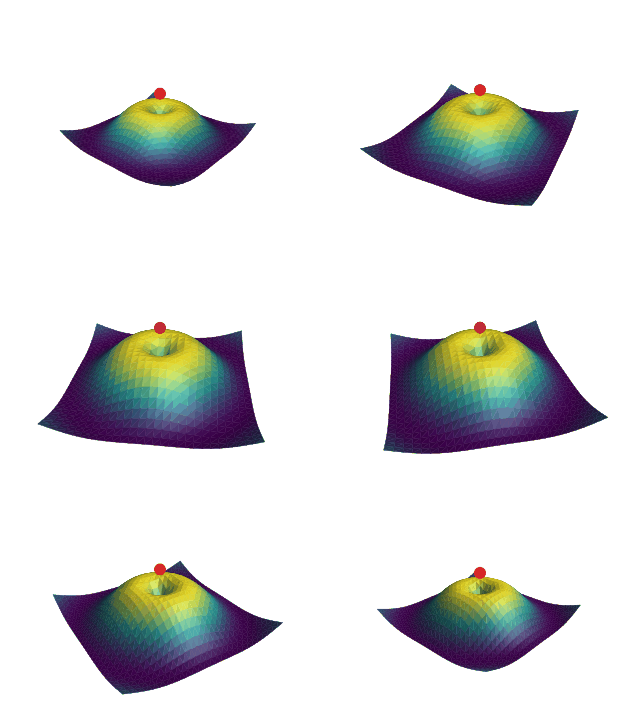
相机绕着打光的高度场曲面转动。
Scene3D(*nodes, overlay=(), camera=None)不可变的 3D 场景,包含几何、光源、群组与一个相机。
Point3D(
    *,
    id,
    opacity=1.0,
    z=0.0,
    visible=True,
    semantics=None,
    position=Vec3(x=0.0, y=0.0, z=0.0),
    size=4.0,
    symbol='circle',
    color=...,
)
3D 空间中的点标记,位置、大小、颜色与透明度都能制作动画。
Line3D(
    *,
    id,
    opacity=1.0,
    z=0.0,
    visible=True,
    semantics=None,
    color=...,
    width=2.0,
    cap='round',
    join='round',
    dash=(),
    draw_progress=1.0,
    start=Vec3(x=0.0, y=0.0, z=0.0),
    end=Vec3(x=1.0, y=0.0, z=0.0),
)
单一 3D 线段,由目前的相机投影。
Polyline3D(
    *,
    id,
    opacity=1.0,
    z=0.0,
    visible=True,
    semantics=None,
    color=...,
    width=2.0,
    cap='round',
    join='round',
    dash=(),
    draw_progress=1.0,
    points=...,
    closed=False,
)
由有顺序的 3D 点组成的折线,画成相连的线段。
Mesh3D(
    *,
    id,
    opacity=1.0,
    z=0.0,
    visible=True,
    semantics=None,
    color=...,
    material=...,
    edge_color=None,
    edge_width=0.5,
    two_sided=True,
    mesh=...,
)
带索引的顶点与面,拓扑会经过验证,可选用每个面的颜色与材质设置。
Surface3D(
    *,
    id,
    opacity=1.0,
    z=0.0,
    visible=True,
    semantics=None,
    color=...,
    material=...,
    edge_color=None,
    edge_width=0.5,
    two_sided=True,
    grid=...,
    colorscale=None,
    value_range=None,
)
由 \(x,y\) 网格与高度值创建的规则高度场曲面。常用的建构方式是 Surface3D.height_field(id, xs, ys, zs)。
Group3D(
    *,
    id,
    opacity=1.0,
    z=0.0,
    visible=True,
    semantics=None,
    children=(),
    transform=...,
)
一组有顺序的 3D 节点,共用同一个变换与透明度。
Camera3D(
    *,
    id='camera',
    opacity=1.0,
    z=0.0,
    visible=True,
    semantics=None,
    position=Vec3(x=5.0, y=-7.0, z=4.0),
    target=Vec3(x=0.0, y=0.0, z=0.0),
    up=Vec3(x=0.0, y=0.0, z=1.0),
    projection='perspective',
    fov=0.6981317007977318,
    ortho_height=6.0,
    near=0.1,
    far=1000.0,
)
透视或正交相机,有位置、目标、裁切平面与投影设置。它的属性和一般节点一样可以制作动画,所以绕行只是一个 position 动作。
3D 的点或方向。
ColorScale(stops)由 0 到 1、依序排列的 (位置, 颜色) 配对。
通过有序的色标,把数值对应到颜色。
Material(ambient=0.35, diffuse=0.65, specular=0.0, shininess=32.0)永远被照亮的比例。
随光线变化的比例。
高光强度。
高光的集中程度。
表面的环境光、漫射与镜面反应。
DirectionalLight3D(
    *,
    id,
    opacity=1.0,
    z=0.0,
    visible=True,
    semantics=None,
    direction=Vec3(x=-0.4, y=0.6, z=-0.7),
    color=...,
    intensity=1.0,
)稳定的编号。
光线行进的方向。
亮度。
朝单一方向照射的光源,像太阳那样。
组合时间
Motion不可变的变化描述。动作可以依序、重叠、延迟、重复、反转或裁切。
Timeline(motion, base, registry=...)动作树编译后的形式,可以直接求出任意有效时间的属性值。
Keyframe(time, value, easing=None, hold=False)某个时间点的属性值,也可指定通往下一个区间的缓动规则。hold=True 会让这个值维持到下一个关键帧。
Keyframes(target, frames, easing=...)同一属性的关键帧串行,会检查端点与时间顺序是否合法。
motion = (
    a.animate.position.to(Vec2(5, 5), duration=1.0)
    .then(b.animate.opacity.to(1.0, duration=0.5))
    .with_(c.animate.size.to(9, duration=0.5), offset=1.0)
    .mark("settled")
)
then 在前一段结束时开始下一段。with_ 则在前一段内部的某个偏移时间开始。两者的总长度见时间与缓动。
场景之间的转场
为两个场景创建动作。编号相同的节点会配成一对,并对兼容的属性做插值。
TransitionPolicy(enter='fade', exit='fade')决定没有对象或结构不兼容的节点要如何进场、退场、交叉淡化或报错。
路径、网格与曲面都有专用的变形工具。自动范式推不出你要的拓扑时,请明确提供对应方式(参见变形)。